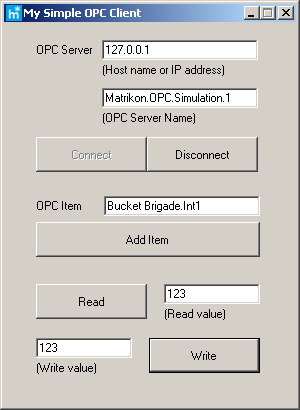
As request from our friends, here we create a simple VB application/project to communicate with OPC Server.
Previously, we create
My OPC Client project, the latest is version 5, with some advanced feature. But some friends need more simple application, so we create this project. The purpose of the application is to connect to OPC Server, Read data and Write data. So here is MySimpleOPCClient..
For testing, we use Matrikon OPC Explorer, you can download from
here.
Please download MySimpleOPCClient project source code from
here.
The steps:
1. Run
Matrikon OPC Explorer
2. Create group, and add some items to monitor, ie "
Bucket Brigade.Int1"
4. Run
MySimpleOPCClient
5. Write "
Matrikon.OPC.Simulation.1" on
OPC Server Name textbox
6. Click
Connect button
7. On
OPC Item textbox, write "
Bucket Brigade.Int1"
8. Click on
Add Item button
9. The value of item is automatically loaded to the
Read Value textbox
10. Try to write new value on
Write Value textbox, then click on
Write button
Note:
Before opening the project, please make sure you have
OPCDAAuto.dll installed/registered on your system. Please follow these steps to register the DLL:
> download DLL from
here
> copy file to /
System32 folder
> open
CMD (command prompt)
> write this command: "
regsvr32 OPCDAAuto.dll"
We create this project with MS Visual Studio Express 2010, and we targeted to .NET Framework 4. If you get some problem, please let us know.
See you next time.. Thank you...